고정 헤더 영역
상세 컨텐츠
본문
1. httpd, vsftpd, bind, bind-utils, bind-lib 설치
yum install httpd vsftpd bind bind-utils bind-lib
(bind 가 dns 설치하는거 !!!)
2. vi /etc/vsftpd/vsftpd.conf 편집기 들어가서 아래와 같이 수정!
12 anonymous_enable=NO
52 xferlog_file=/var/log/xferlog 주석 삭제
84 # You may fully customise the login banner string:
85 banner_file=/ftp/ftp.txt ( 이전 : #ftpd_banner=Welcome to blash FTP service. )
96 #chroot_local_user=YES
97 chroot_list_enable=YES
98 # (default follows)
99 chroot_list_file=/etc/vsftpd/chroot_list
3. 포트 열기!
vi /etc/sysconfig/iptables 에서 20, 21번 포트 열어줄 것!
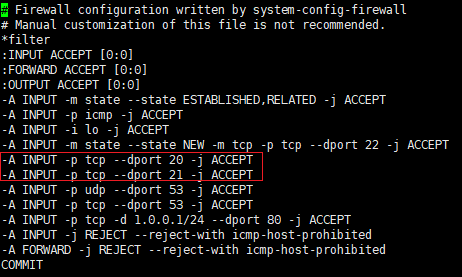
service iptables restart 테이블 설정했으면 반시스 restart!!!
4. 사용자 생성
useradd a
passwd a
useradd b
passwd b
5. ftp사용자리스트 a, b 추가!!
cat /etc/vsftpd/user_list
vi /etc/vsftpd/vsftpd.conf

(( 아래와 같이 편집기 안들어가고 추가해도 된다! 나갈때는 ctrl d
cat > /etc/vsftpd/chroot_list
a
))
6. chroot_list 에서 a 추가
chroot 리스트에 a 추가 해주면
a에서 cd .. 해서 상위 디렉토리로 이동할 수 있다.
7. setenforce 0
service vsftpd restart
[root@localhost ftp]# vi /etc/sysconfig/selinux
# This file controls the state of SELinux on the system.
# SELINUX= can take one of these three values:
# enforcing - SELinux security policy is enforced.
# permissive - SELinux prints warnings instead of enforcing.
# disabled - No SELinux policy is loaded.
SELINUX=disabled
# SELINUXTYPE= can take one of these two values:
# targeted - Targeted processes are protected,
# mls - Multi Level Security protection.
SELINUXTYPE=targeted
8. vi /etc/sysconfig/iptables
service iptable restart
mkdir /ftp
vi /ftp/ftp.txt
cat > /home/a/a.txt
a
cat > /home/b/b.txt
b
anonymous 저장 위치 찾기
cd var/ftp
ls -al
cd /var/ftp/pub
ftp 디렉토리에서 touch ano.txt
==========================================================
dns 설정!!!!!!!!!!!!!!!
vi /etc/named.conf

vi /etc/named.rfc1912.zones

cd /var/named/
ls -al
cp named.localhost babo.com.zone
vi babo.com.zone ( 골뱅이 빼고!, 문자로 끝나면 반드시 점 붙일것!! com. , ns1 도 빼먹지 말것 )
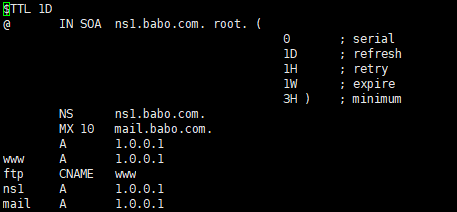
(+ 윈도우 서버에서도 파일 메모장 들어가면 똑같이 되어있다.
var디렉토리에서 ls -al 하면 , named 이 읽기 다 안되어있음
chmod -R o+r named 로 열어줄것 (이거 안하면 안열린다.)
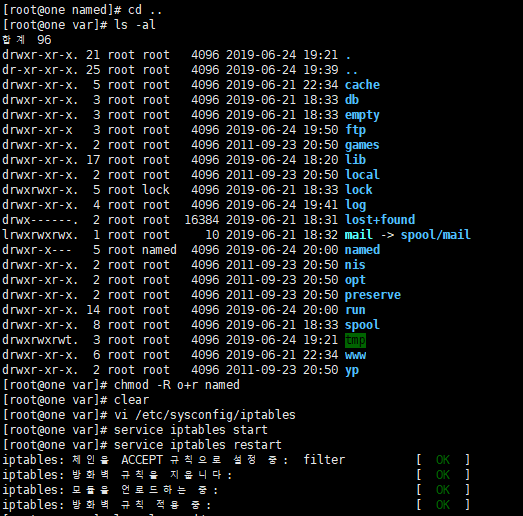
vi /etc/sysconfig/iptables

service named restart
service vsftpd restart

위의 설정 제거 명령어
[root@one /]# service named stop
named 정지 중: [ OK ]
[root@one /]# service vsftpd stop
vsftpd 종료 중: [ OK ]
[root@one /]# rm -rf /var/named/
[root@one /]# rm -rf /etc/named.conf
[root@one /]# rm -rf /etc/named.rfc1912.zone
[root@one /]# rm -rf ftp
[root@one /]# vi /etc/sysconfig/iptables
[root@one /]# yum erase vsftpd httpd bind bind-utils bind-libs
'Linux' 카테고리의 다른 글
| ACL 사용자, 그룹 권한 생성 및 삭제 (0) | 2019.07.03 |
|---|---|
| Mail 설치 및 설정 (0) | 2019.07.01 |
| DHCP 다운 방식(1.소스 , 2.패키지) (0) | 2019.06.24 |
| Linux 파일 다운( 소스 방식, 패키지 방식) (0) | 2019.06.21 |
| 리눅스 파티셔닝 (0) | 2019.06.20 |


댓글 영역