고정 헤더 영역
상세 컨텐츠
본문
1. 소스 다운
Internet Systems Consortium
Support us by making a donation! ISC is a non-profit organization that exists to support the Internet. Our software is open source because we believe in building a better Internet. Your financial support is greatly appreciated. Donate Now!
www.isc.org
wget https://downloads.isc.org/isc/dhcp/4.4.1/dhcp-4.4.1.tar.gz
vi README 명령어에서 설치 방법 확인!
./configure --prefix=/local/dhcp 환경설정 + 경로 설정
yum install -y perl : 위의 confgiure 에러 있을 시
make | make install
mkdir dhcp
/etc/dhcpd.conf 로 심볼릭 링크 걸어주기
마냥 /etc/dhcpd.conf 존재하면 지워주고 ln -/내가 설치한 dhcp경로
/etc/dhcpd.conf.example/etc/dhcpd.conf 로 잡아주면 링크 생긴다.
2. 패키지 설정 방식
1. yum install -y dhcp
2. vi /etc/dhcp/dhcpd.conf : dhcp 편집 들어가기
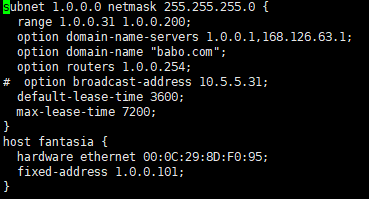
나머지 다 지우고 위의 방식대로 설정!
단, hardware ehternet 은 본인이 서비스 받을 윈도우의 MAC 주소 붙여넣기 ( :: 방식으로 )
fixed-adress : 1.0.0.101 예약 설정
3. windwo7 에서
ipconfig /release
ipconfig /renew
ipconfig /all 로 확인!!

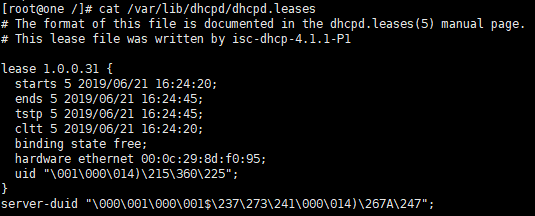
3. cat /var/lib/dhcpd/dhcpd.leases (+ dhcp 가 서비스한 ip 확인하는 명령어)
'Linux' 카테고리의 다른 글
| Mail 설치 및 설정 (0) | 2019.07.01 |
|---|---|
| httpd , ftp, dns 패키지지 설치 및 설정 (0) | 2019.06.24 |
| Linux 파일 다운( 소스 방식, 패키지 방식) (0) | 2019.06.21 |
| 리눅스 파티셔닝 (0) | 2019.06.20 |
| Linux 기본 명령어 (0) | 2019.06.20 |


댓글 영역